MinIO introduced a new feature to AIStor for taking a node offline for maintenance.
For this feature, I needed to explain how the feature works.
As an AIStor feature applicable both in Kubernetes and non-Kubernetes environments, it was also important to distinguish it from the similar kubectl cordon functionality system administrators would also be familiar with.
Some notes:
- The quote block text used a shortcode in the theme we used to create admonitions.
- For the diagram, I used a skill another team member had created for Claude to use for creating SVG diagrams.
- Links in the text here are intentionally broken, but would have cross-linked to other pages in the docs.
AIStor allows you to temporarily remove nodes from active service for planned maintenance operations. Removing nodes allows administrators to gracefully take nodes offline without disrupting cluster operations, similar to the cordon functionality in Kubernetes. A cordoned node finishes in-flight operations and marks itself as unavailable for any other operation. Use this to do hardware maintenance on a node, complete operating system updates, or perform troubleshooting.
In Kubernetes environments, the AIStor cordoning function applies to the Pod running the associated workload. It does not affect any other Pods or services running on the Kubernetes worker, and acts to ensure the scheduler does not reschedule that Pod during ongoing maintenance operations.
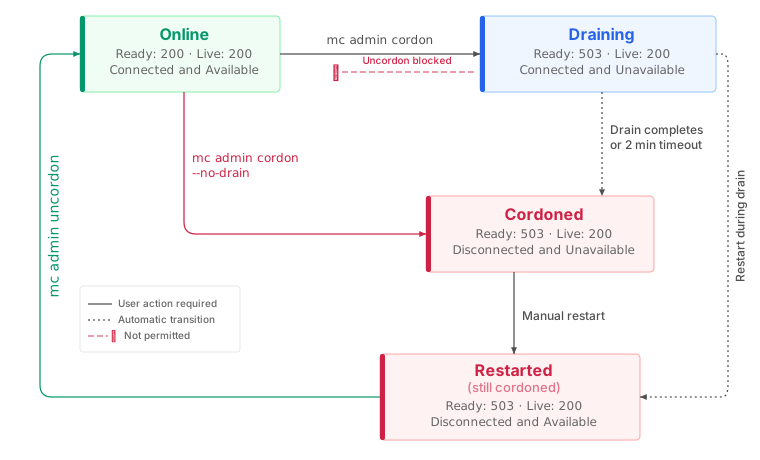
The following diagram illustrates the node state transitions during the maintenance workflow. Each state shows the readiness and liveness endpoint responses and the grid connection status. Solid arrows indicate transitions that require a user action. Dotted arrows indicate automatic transitions where you wait for the system to proceed.
Cordon a node
The mc admin cordon command removes a node from active service.
By default, the command initiates a graceful drain of existing connections before fully cordoning the node.
Replace ALIAS with your AIStor cluster alias and NODE with the target node address (for example, node1.example.com:9000).
Connection management when cordoning a node
When you cordon a node, AIStor performs a graceful drain of existing connections:
- The node enters a draining state.
- The health endpoint returns HTTP 503, preventing new client requests from routing to this node.
- AIStor waits up to two minutes to allow existing connections to complete.
After draining completes, the node transitions to a fully cordoned state. AIStor disconnects all grid connections.
To cordon a node immediately, you can skip the drain phase using the --no-drain flag:
mc admin cordon --no-drain ALIAS NODE
Immediate cordon: Using
--no-drainimmediately terminates all in-progress requests to the node. Use this option only when you need to quickly isolate a node and can accept potential request failures.
Monitor node status
Use mc admin info to view the status of nodes in your cluster, including cordoned and draining nodes:
mc admin info ALIAS
Nodes display one of the following states:
| State | Description |
|---|---|
| Online | Node is operational and serving requests. |
| Draining | Node is completing existing requests before cordoning. |
| Cordoned | Node is offline for maintenance. |
| Offline | Node is not responding. |
Uncordon a node
Use the mc admin uncordon command to direct the node to return to active service.
You must manually restart the AIStor process on a cordoned node before running mc admin uncordon, such as by running sudo systemctl restart minio on the node.
The uncordon command does not restart the node.
Behavior
State persistence
AIStor persists the cordon state to storage. If a draining or cordoned node restarts before being uncordoned, it automatically re-enters the cordoned state. A draining node that restarts transitions directly to the fully cordoned state.
This behavior ensures that nodes do not accidentally rejoin the cluster during maintenance windows.
Quorum protection
Before allowing a cordon or drain operation, AIStor validates that the operation does not cause the cluster to lose quorum. If cordoning the node would reduce the cluster below the minimum required nodes for read and write operations, the command fails with an error similar to the following:
cluster would lose quorum
For clusters operating near minimum quorum, verify the impact of taking a node offline before cordoning.
Use mc admin info to review current cluster health and capacity.
Kubernetes considerations
When running AIStor on Kubernetes, the cordon workflow requires additional considerations for Pod lifecycle management.
AIStor cordon vs Kubernetes cordon
The mc admin cordon command operates at the AIStor application layer, not the Kubernetes node layer.
It removes an AIStor Pod from cluster participation while the Pod continues running.
This differs from kubectl cordon, which prevents new Pods from scheduling on a Kubernetes node.
For AIStor maintenance, use mc admin cordon to gracefully stop activity on a Pod on the AIStor cluster before performing maintenance on the underlying infrastructure.
Maintenance workflows
AIStor Pod
The following workflow applies to AIStor deployments managed by the Operator or deployed directly as StatefulSets:
- Cordon the pod - Run
mc admin cordontargeting the Pod’s service address. - Wait for drain - Monitor with
mc admin infountil the Pod shows as cordoned. - Perform maintenance - Update the Pod configuration, storage, or other Pod-level infrastructure.
- Delete the Pod - Use
kubectl delete podto trigger a restart. - Wait for Pod to be ready - Monitor with
kubectl get podsuntil the Pod is running. - Uncordon the Pod - Run
mc admin uncordonto return the Pod to service.
Kubernetes node
If you need to perform maintenance on the underlying Kubernetes node (not just the AIStor Pod), combine Kubernetes and AIStor cordoning:
- Cordon all AIStor Pods on the node using
mc admin cordon. - Cordon the Kubernetes node using
kubectl cordon. - Drain the Kubernetes node using
kubectl drain(if needed). - Perform node maintenance.
- Uncordon the Kubernetes node using
kubectl uncordon. - Delete the AIStor Pods to trigger restarts.
- Uncordon the AIStor Pods using
mc admin uncordon.
StatefulSets maintain stable network identities for Pods. When a Pod restarts, it retains the same hostname and PersistentVolumeClaims, so the node address used with
mc admin cordonandmc admin uncordonremains the same.
What’s next
When hardware fails and needs replacement rather than maintenance, see Healing for drive, node, and site recovery procedures.